


Preserve your UTM parameters and advertising settings for your A/B tests
In the tab Settings From your experience, you can manage all the parameters to be transmitted in the URLs of your variants, in particular to maintain and enrich your tracking: UTM Source, UTM Campaign, UTM Content, and any other necessary parameter.
For each parameter, you can use:
- a fixed value (For example
utm_source = Google) ; - or a dynamic value, automatically replaced by the data transmitted by your advertising platform (Campaign ID, Click ID, etc.).
Click on Add a parameter to create as many custom parameters as needed (for example, a Click ID). BlastOptimize then automatically reconstructs the URL with all the defined parameters, so you can continue to accurately identify the origin of your traffic, campaigns, content, and advertising IDs across your different variations.
Why manage UTM parameters in BlastOptimize?
Avoid manually adding UTM parameters to the URLs of each variant. Centralize them in the section Settings in order to maintain readable URLs and consistent data retrieval.
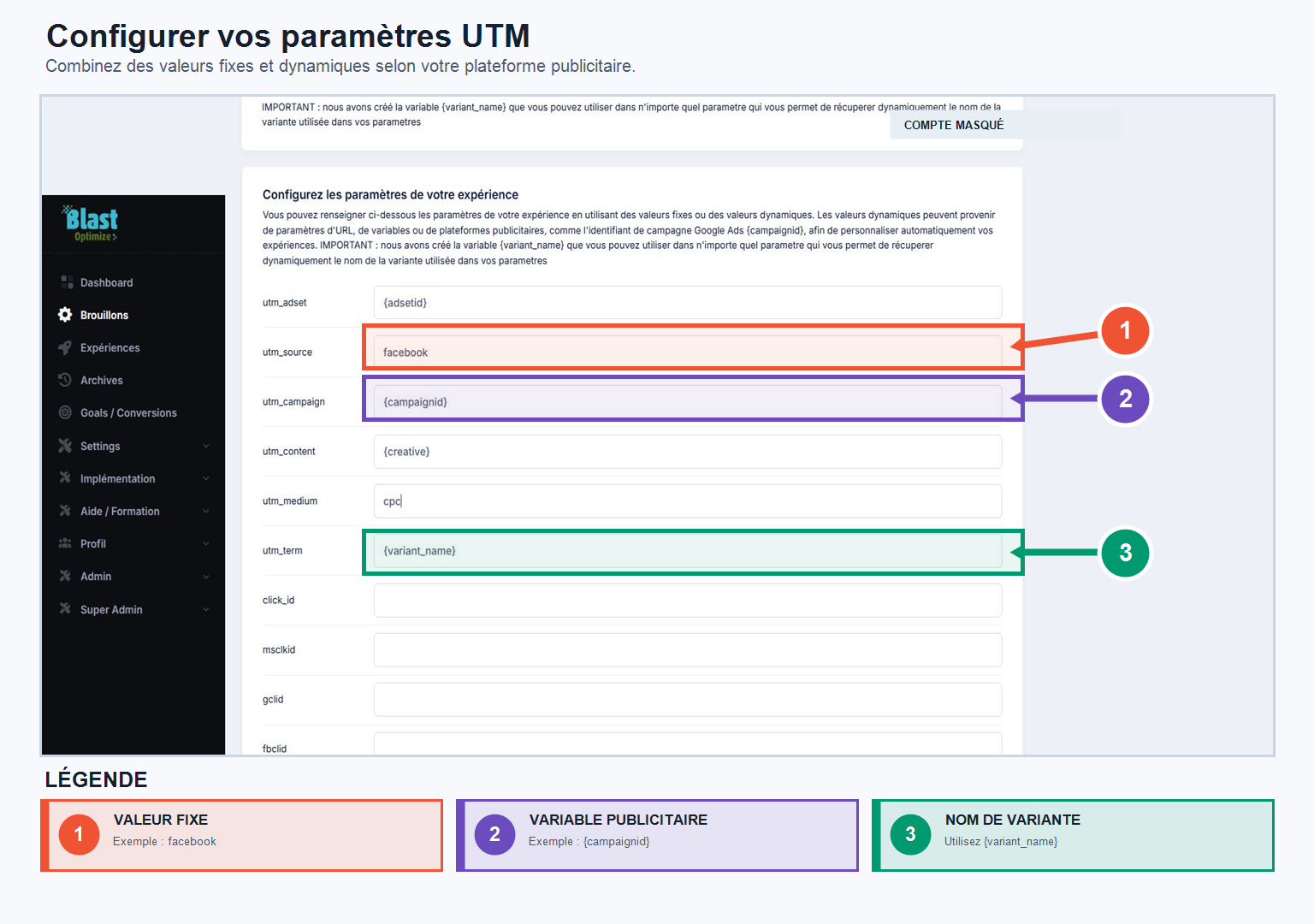
- Create as many parameters as needed.
- Use a fixed value, for example
GoogleOrFacebook. - Add dynamic values to convey the variant name or campaign information.
To reuse an existing nomenclature
If you are migrating from Thrive or another tool, recreate your historical naming convention in BlastOptimize instead of copying the settings directly into the URLs.