


Install the global tracking script and the anti-flicker script.
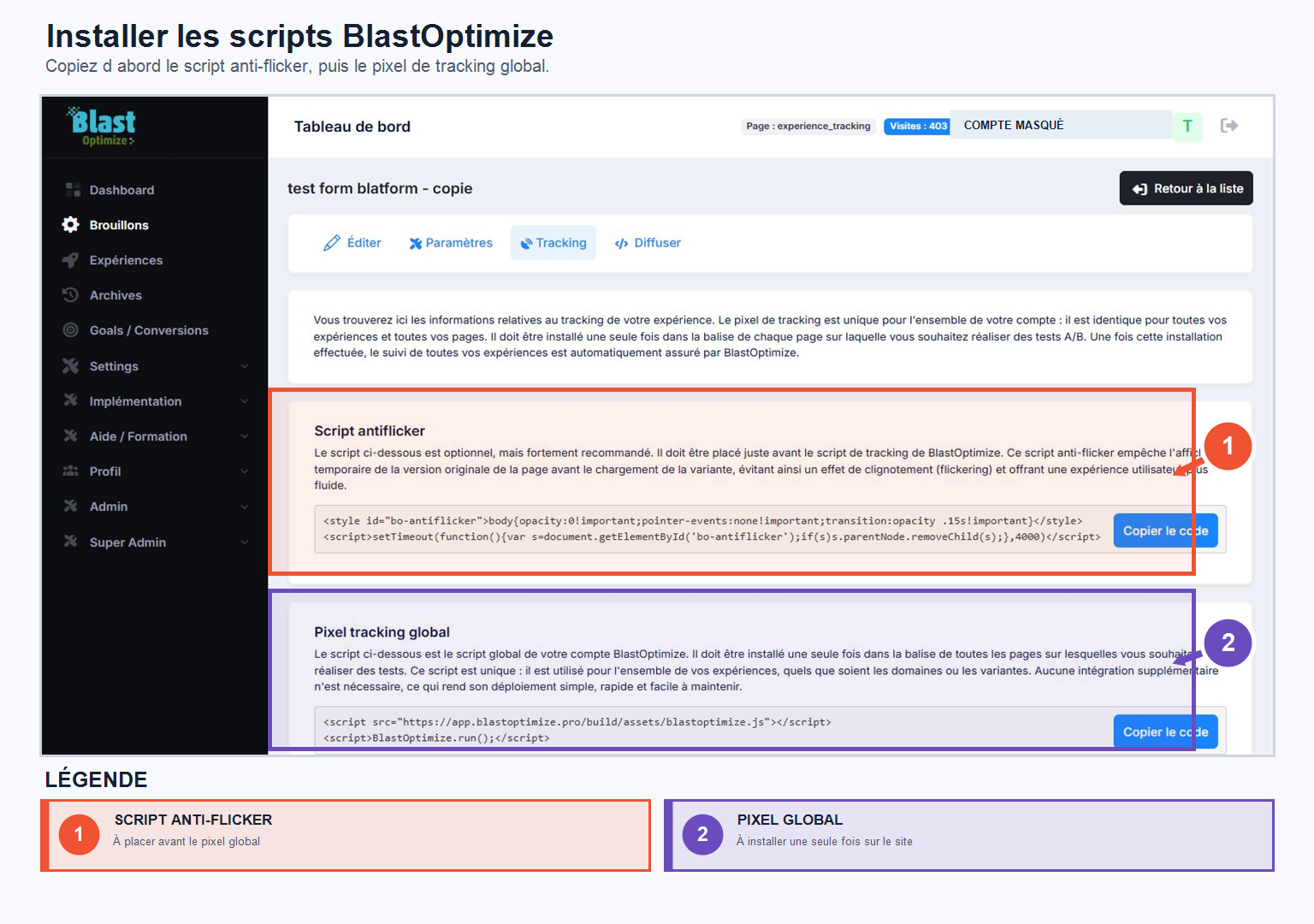
The anti-flicker script
It avoids the flickering effect that can occur when a visitor arrives on version A before being redirected to variant B. Without this script, the user might briefly see the original page before the variant is displayed. It must be positioned directly within the tag of your site.
The global tracking pixel
This is the main script that allows BlastOptimize to recognize visitors, distribute traffic across your variations, and measure the performance of your experiments. It must be installed in the of all pages involved in your tests (original page, variants, and more broadly all pages to be integrated into your experiments).
A single script is used everywhere, regardless of the domain, page, or experience—you don't need to create a different one for each test. You retrieve it only once, from Implementation → TrackingThen install it on all the necessary pages.
When to use anti-flicker?
Anti-flicker is useful when the variant is applied in the browser after the page has loaded. It briefly hides the original page to prevent it from appearing before the variant.
With the ultra-fast server-side streamingThis is generally not necessary: the variant is determined before display. The user receives the correct version directly.
- Server-side streaming: Anti-flicker is not necessary in most cases.
- Browser-side modification: Use it to avoid flickering.